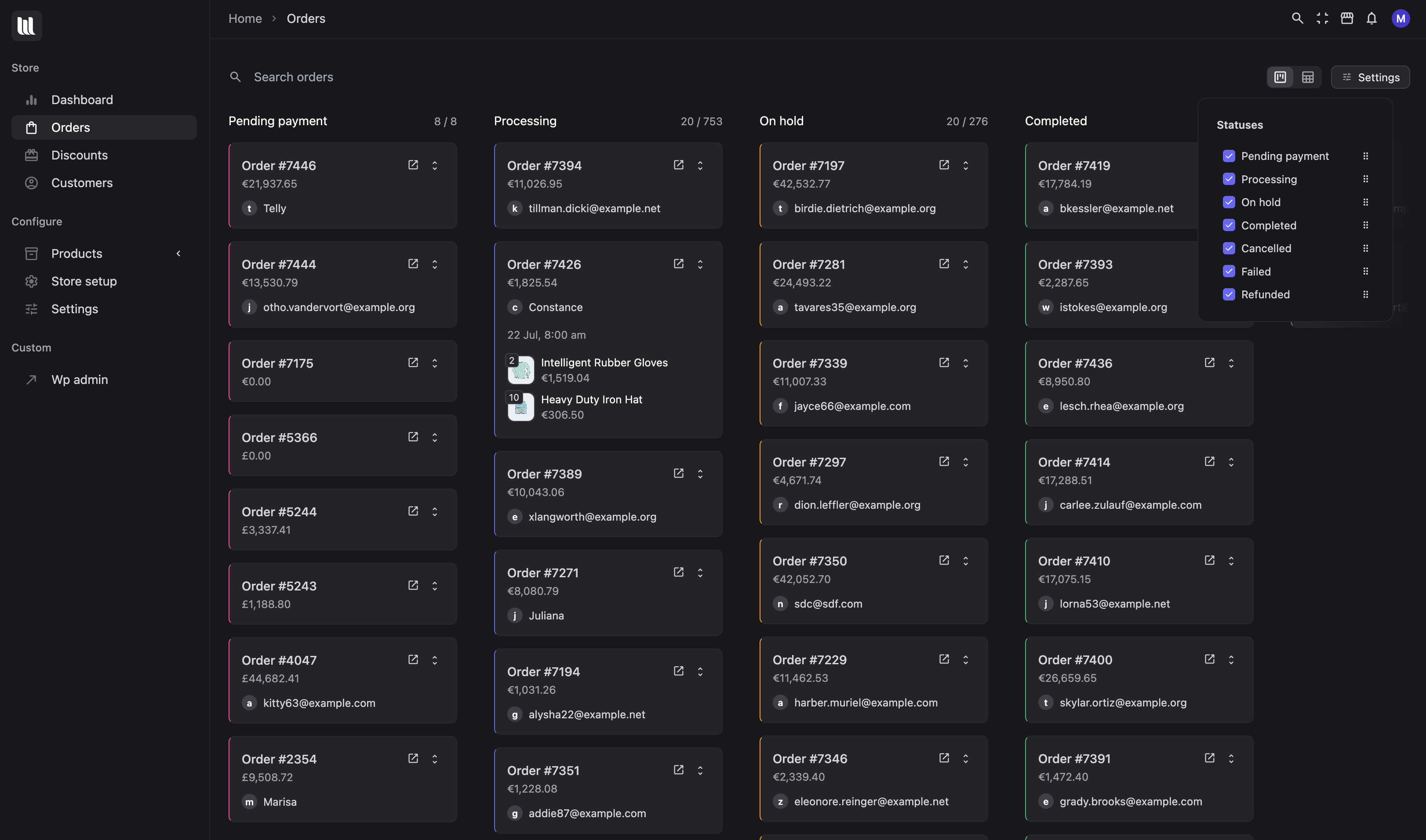
Search demand for woocommerce order fulfillment and order fulfillment woocommerce is not mysterious. The default orders screen tells you a status. It does not tell you where the work is stuck.
April 2026 made that gap more official. WooCommerce 10.7 shipped a beta Fulfilments API: typed methods for tracking numbers and shipping providers, a fulfilment order-note group, and a settings UI for custom providers under Shipping → Shipping Providers. That is the right data model. Most stores still manage the work in a spreadsheet or a Slack channel.
What “order fulfilment” means on a real WooCommerce store
For a small catalogue, fulfilment is “mark processing, print label, mark completed”. At volume it splits into lanes:
- Paid and ready to pick
- Waiting on a pre-order or a supplier
- Partially packed (one item back-ordered)
- On hold for fraud or a customer email
- Handed to a 3PL, with a tracking number that must land on the order
- Refunded or failed, mixed into the same table if you are not careful
WooCommerce statuses can represent those lanes. A single dropdown on a row cannot show you that “On hold” is three times longer than “Processing” this week.
What WooCommerce 10.7 changed for fulfilment data
The beta Fulfilments feature is worth knowing about even if you do not turn it on yet:
get_tracking_number()/set_tracking_number()and matching shipping-provider methods- Providers as a taxonomy, with a tracking URL template
- An orders-list filter for those providers
- A proper data store so extensions can override storage
10.7 also cut a lot of HPOS query waste on the orders REST endpoint (Woo’s notes: 271 queries down to 132 via cache priming). That helps any admin — including ours — that reads orders through the API.
Treat Fulfilments as beta. Do not rebuild your warehouse process on it until you have tested shipping-provider taxonomies against your label plugin.
A fulfilment workflow that does not depend on a plugin fashion
- Name the columns you actually use. Not every store needs “Refunded” on the board. Many need “Waiting on stock”.
- Make status changes visible. Dragging a card should update the WooCommerce status. If the board is a screenshot of the table, it will rot.
- Keep customer context one click away. Fulfilment questions are usually “which variant?” and “did they order before?”.
- Surface new orders without refresh. Flash sales punish anyone staring at a stale list.
- Write tracking back to the order. Whether you use 10.7’s API or your label plugin, the customer email has to stay the source of truth.
Why we still recommend a kanban for WooCommerce orders
A table is a good audit log. A board is a good shift briefing. VendBase order kanban maps your WooCommerce statuses to columns you name. Drag a card, the status updates. Pile-ups become obvious at a glance — the “on hold” column that never empties is a process bug, not a reporting problem.
If you are comparing tools, ignore anything that stores orders outside WooCommerce. Fulfilment plugins should decorate Woo’s order object, not fork it.
Related reading
When we launched the board we wrote a shorter product note: Introducing Orders Kanban in VendBase. For teams who should not see wp-admin at all, pair the board with the frontend admin.
WooCommerce is getting a real fulfilment data layer. Your team still needs a fulfilment workplace. That is the product we build. Lifetime licences start at $58.
Leave a Reply